API Key Leak Intercept · for security & IT teams
Catch secrets before they reach AI.
Installed company-wide by IT. It holds API keys and credentials at the send button, and shows you who tried.
Free plan: no account, no card
64 detection patterns and 29 checksum validators, all inside the browser. See what it catches · Request a demo

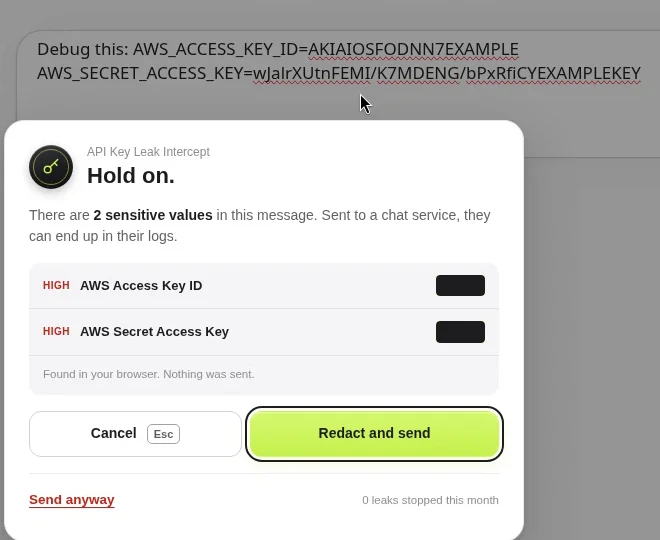
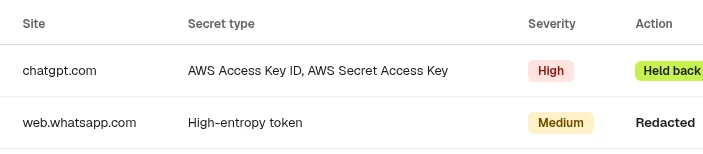
The three seconds between paste and send.
I nearly pasted a live OpenAI key into a chat to debug a failing request. This extension lives in those three seconds: it catches the secret in your browser, before Send. The secret itself never leaves the machine.


- 64detection patterns for keys, tokens and personal data
- Localruns in your browser. Secret values never leave it
- Chrome + Firefoxthe same detection on both
The free tier needs no account. Pro adds personal data checks, redaction and team alerts at $7.99 a month. Also on the Chrome Web Store.
Real capture
See it hold a real paste
Real capture with a demo account. The keys are AWS’s published example values.
Runs on ChatGPT, Claude, Gemini, Microsoft Copilot, Perplexity, Mistral, DeepSeek, Grok, Notion, Slack, GitHub and more out of the box, or every site in universal mode.
The problem
Secrets leave through the chat box
People paste whatever gets them an answer. Logs, config files and stack traces carry live keys and customer data, and once a message is sent it sits in someone else’s logs.
- 01
By mistake
An engineer pastes an error log or a .env block into an AI chat to debug it. The AWS key or database password inside goes out with the question.
- 02
On purpose
Someone sees a warning and sends anyway because they are in a hurry. Without a record, nobody finds out until the key is abused.
- 03
Out of sight
The paste happens in a browser tab, before code review or any repository scanner sees it. Security needs a control where the text is typed.
How it works
Detect, hold, report. Before the message leaves.
Everything happens in the browser in the moment between pressing Enter and the message leaving.
- 1
Detect, locally
On Enter or send, the message is checked against 64 detection patterns and 29 checksum validators inside the browser. Clean messages pass straight through.
- 2
Hold the send
If it finds a secret, a warning lists what it found. The employee can Cancel, Redact and send with a typed placeholder like [API_KEY_1], or Send anyway.
- 3
Report to IT
The outcome goes to your console and alert channels as metadata: who, which site, which secret type, severity, action and time. The secret and the message text stay on the machine.
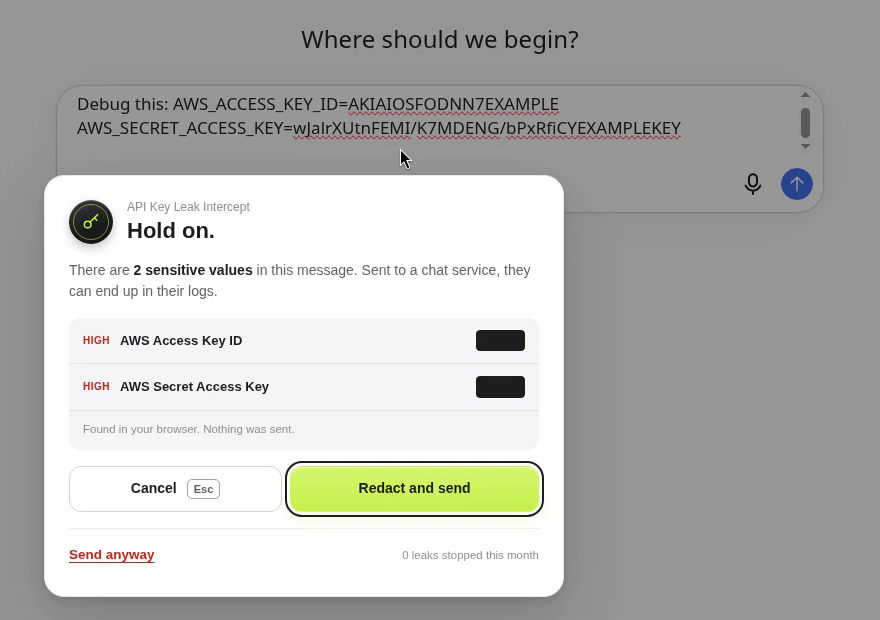
The real warning on chatgpt.com. Values are masked, and nothing has been sent.
The team console
Every catch, across the company, in one feed
Security and IT see who hit a secret, on which site, and what they did next. Secret strings never leave the employee’s browser, so the console holds metadata only.

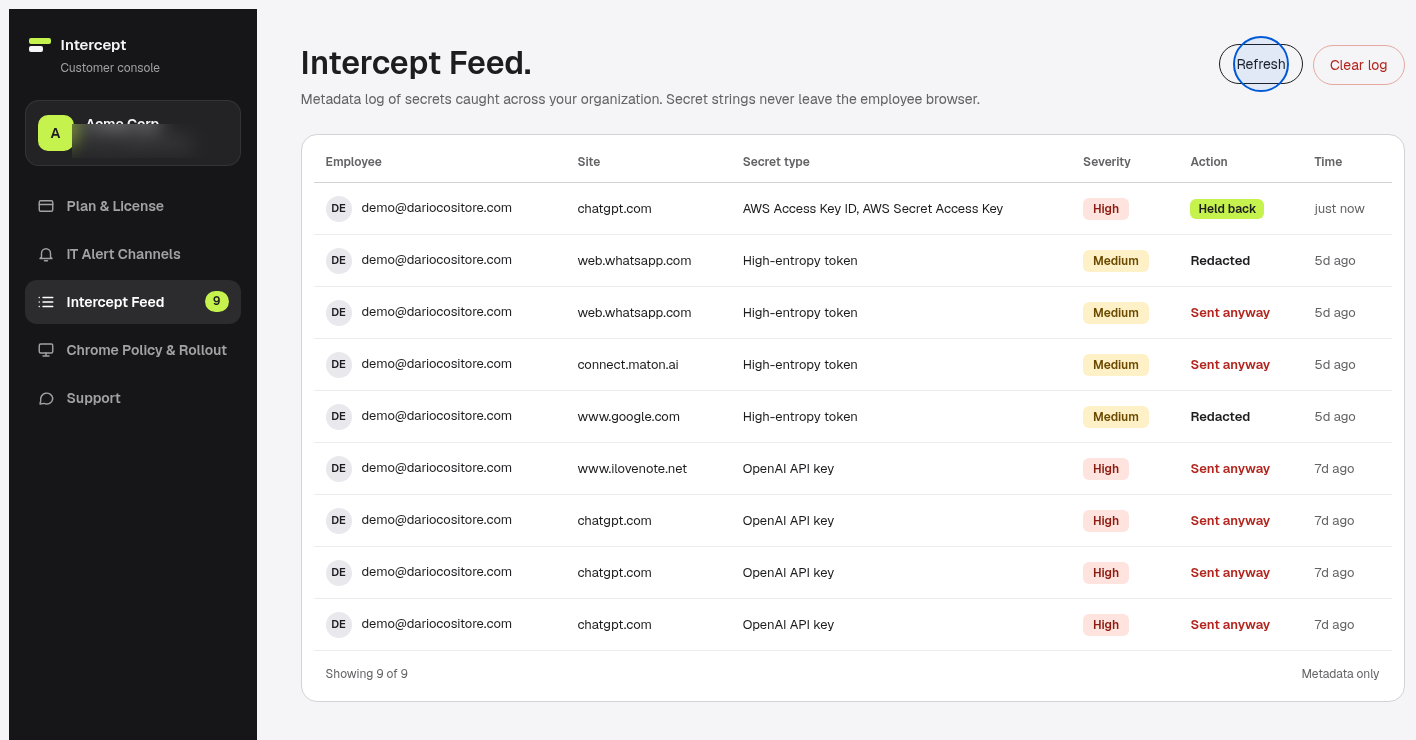
- 1
Intercept Feed
The last 500 alerts per organization, filtered by person, site and action, with live installs and seats in use.
- 2
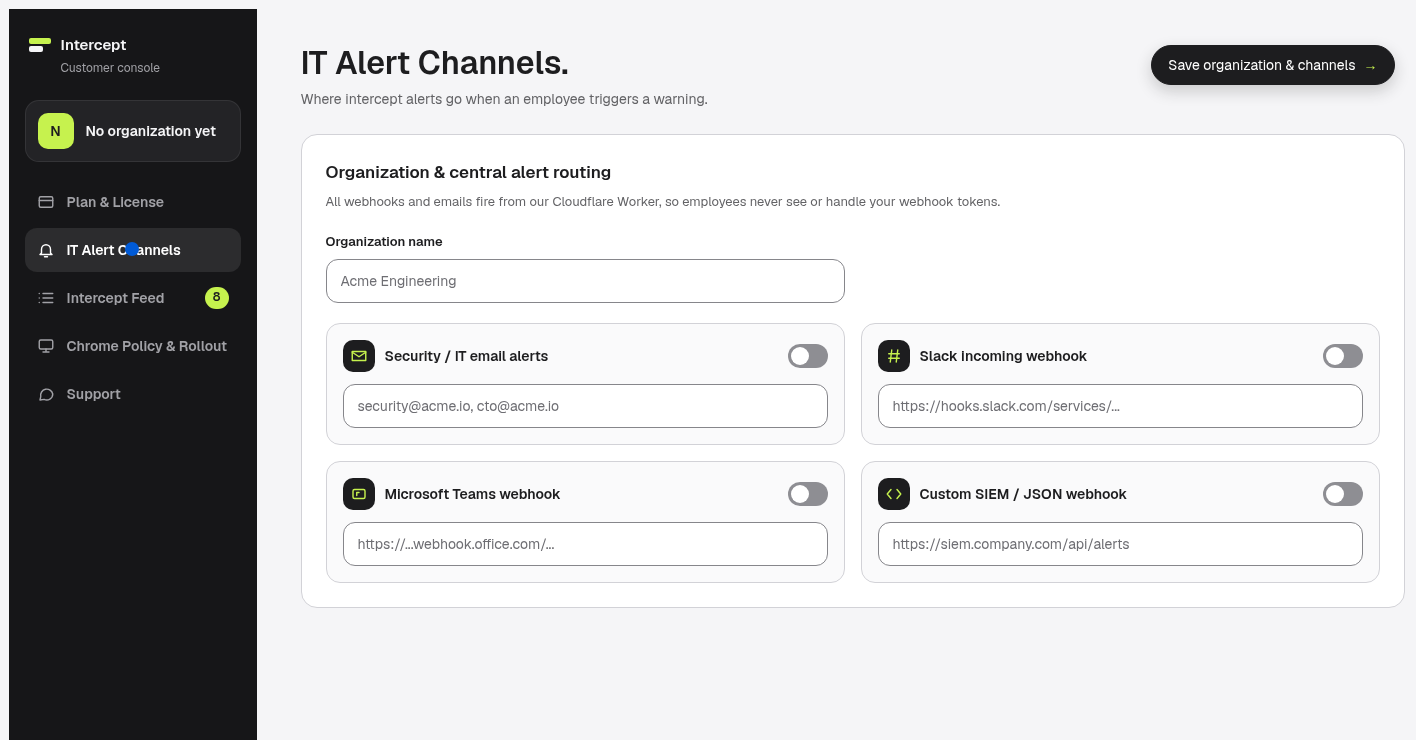
Alert routing
Slack, Microsoft Teams, Telegram, email or a custom SIEM or JSON webhook, fired from the backend so employees never handle your tokens.
- 3
Override control
Every Send anyway notifies IT. Ask for a one-line reason, or block Send anyway altogether.
- 4
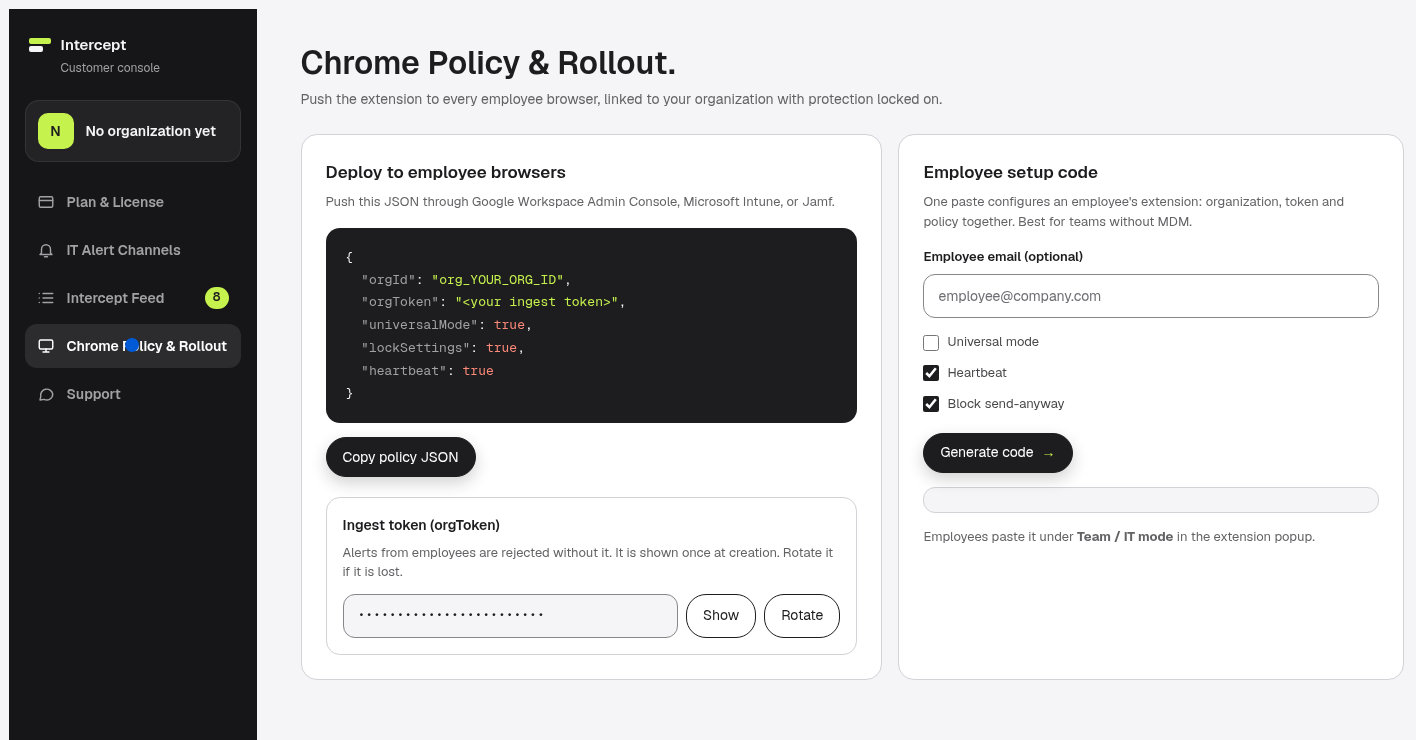
Chrome policy and rollout
A ready-made policy JSON for Google Workspace Admin, Microsoft Intune or Jamf, or a setup code for teams without device management.
- 5
Seats you can see
One machine takes one seat. Installs in use are shown against seats bought, and a heartbeat every six hours shows what is running.
- 6
Priority support
A direct message from the console, with a personal reply at your account email within two business days.
What it catches
Keys, credentials and personal data
All detection runs locally. The coverage page lists every pattern, generated from the shipped source.
API keys and tokens
25 built-in detectors for OpenAI, Anthropic, AWS, GitHub, Stripe, Google, Slack, JWTs, Bearer tokens, PEM private keys and more, plus a high-entropy scanner for unknown formats.
Personal data
Email addresses, phone numbers, payment cards, IBANs, IPv4 addresses and national identity numbers for 30 countries.
Your own patterns
Up to 50 custom regular expressions for internal tokens. On Team they are pushed by policy.
Rollout
Live on every machine in a day
Team plans come with same-day setup. The IT admin guide covers each step.
- 1
Buy seats
From 5 seats on the plans page. Invoicing on request.
- 2
Set up your organization
Name it in the console and choose where alerts go.
- 3
Push it to every browser
Deploy the policy JSON through Google Workspace Admin, Intune or Jamf. Employees cannot remove it. No MDM? One setup code per machine.
- 4
Watch the feed
Catches, overrides and live installs show up in the console. Add seats as you grow.
Privacy and security
Ready for your security review
Everything the extension does is written down in the privacy policy and readable in the source on GitHub.
- Detection runs inside the browser. The secret value and the message text are never transmitted.
- Alerts carry metadata only: employee email, site, page URL up to the path, secret type, severity, action and time.
- The backend keeps up to 500 alerts per organization. Clear the log from the console at any time.
- For team alerts, your company is the data controller under the GDPR.
- Manifest V3, three permissions (storage, alarms, scripting), about 51 KB of code, no analytics or tracking.
Plans
Start free. Cover the whole team when you’re ready.
Full details and checkout are on the plans page.
-
Personal Free
$0forever
No account or card required.
- 25 API key and token detectors
- High-entropy token scanner
- Warns on every detection, no monthly cap
- 40+ AI chat sites
-
Pro
$7.99/ month
Or $59 a year. 14-day money-back guarantee.
- Redact and send with typed placeholders
- Personal data checks for 30 countries
- Custom regex patterns
- Universal mode on every site
- Personal intercept feed
-
Most teams
Team Volume
$4/ seat / month
$3 per seat at 50+ seats. From 5 seats.
- Force-install so employees cannot disable it
- Alerts to Slack, Teams, Telegram, email or SIEM
- Team console with the last 500 events
- Ready-made Chrome policy JSON
- Priority onboarding and invoice billing
Larger rollout or custom invoicing? Write to [email protected]
Roadmap
Where it’s going. Built today, planned next
Today the product is the Chrome extension and the team console. The goal is one dashboard that sees every leak attempt across the company, wherever the text is typed. Next and Later are plans, not features you can buy today.
- Now
Chrome and the console
- Chrome extension on the Chrome Web Store
- Team console, alert routing and policy rollout
- Universal mode for every site
- Next
More browsers and developer tools
- Edge and Firefox from the same detection package
- Safari
- CLI pre-commit hook and CI gate, VS Code and JetBrains plugins
- Team Dashboard v1 with trends and a policy engine
- Later
Full-organization coverage
- SSO (SAML and OIDC) and SCIM provisioning
- Compliance and fleet-wide audit log exports
- Mobile paste guard
- Public API, SDK and git history scanner
Questions
What security teams ask
Do you or our IT team ever see the secret itself?
No. Detection runs inside each employee's browser. The secret value and the message text never leave the machine. Alerts carry metadata only: the employee's email, the site, the page URL up to the path, the secret type, severity, the action taken and a timestamp.
Can employees switch it off or remove it?
Not on a force-installed machine. When IT pushes the extension through Chrome Enterprise policy, Google Workspace Admin, Microsoft Intune or Jamf, employees cannot uninstall it, switch protection off or sign out of a seat the company owns. The popup shows that it is managed by IT.
What happens when someone clicks Send anyway?
The message goes out and IT gets an alert that the warning was overridden. The organization can ask for a one-line reason, up to 140 characters, or block Send anyway altogether through the employee setup code.
We don't use MDM. Can we still roll it out?
Yes. The console generates an employee setup code. One paste in the extension popup links that machine to your organization, its ingest token and its policy.
How are seats counted?
One installed machine takes one seat. The console shows installs in use against the seats you bought, and setup codes stop at the seat count until you add seats. A machine past the limit keeps protecting the person at the keyboard and stops reporting, and the dashboard shows that overage.
Which browsers does it support?
Chrome today, from the Chrome Web Store. Edge and Firefox builds share the same detection package and are on the roadmap, along with Safari, a CLI and IDE plugins.
Is there a free version?
Yes. The personal Free plan costs nothing, needs no account and catches API keys and high-entropy tokens on 40+ AI chat sites. Pro adds redaction, personal data checks, custom patterns and universal mode for $7.99 a month or $59 a year.
For security & IT teams
See it on your team’s machines
Tell me how many people need cover and how you manage their browsers. I’ll walk you through the console and the rollout.
API Key Leak Intercept is built, sold and supported by Dario Cositore, an independent developer in Italy. About Dario

Get the next teardown in your inbox.
One email a week: a real workflow failure, the pattern behind it, and the fix in three steps. Plus release notes when the extension ships a new version.
One email a week. Leave with one click.